Show HN for December 2, 2025
40 itemsWebclone.js – A simple tool to clone websites #
Repo: https://github.com/jademsee/webclone
Feedback, issues, and PRs are very welcome.
RunMat – runtime with auto CPU/GPU routing for dense math #
Since then, I’ve taken it further with RunMat Accelerate: the runtime now automatically fuses operations and routes work between CPU and GPU. You write MATLAB-style code, and RunMat runs your computation across CPUs and GPUs for speed. No CUDA, no kernel code.
Under the hood, it builds a graph of your array math, fuses long chains into a few kernels, keeps data on the GPU when that helps, and falls back to CPU JIT / BLAS for small cases.
On an Apple M2 Max (32 GB), here are some current benchmarks (median of several runs):
* 5M-path Monte Carlo * RunMat ≈ 0.61 s * PyTorch ≈ 1.70 s * NumPy ≈ 79.9 s → ~2.8× faster than PyTorch and ~130× faster than NumPy on this test.
* 64 × 4K image preprocessing pipeline (mean/std, normalize, gain/bias, gamma, MSE) * RunMat ≈ 0.68 s * PyTorch ≈ 1.20 s * NumPy ≈ 7.0 s → ~1.8× faster than PyTorch and ~10× faster than NumPy.
* 1B-point elementwise chain (sin / exp / cos / tanh mix) * RunMat ≈ 0.14 s * PyTorch ≈ 20.8 s * NumPy ≈ 11.9 s → ~140× faster than PyTorch and ~80× faster than NumPy.
If you want more detail on how the fusion and CPU/GPU routing work, I wrote up a longer post here: https://runmat.org/blog/runmat-accel-intro-blog
You can run the same benchmarks yourself from the GitHub repo in the main HN link. Feedback, bug reports, and “here’s where it breaks or is slow” examples are very welcome.
Doomscrolling Research Papers #
Would love your thoughts on Open Paper Digest. It’s a mobile feed that let’s you “doomscroll” through summaries of popular papers that were published recently.
Backstory There’s a combination of factors lead me to build this:
1. Quality of content social media apps has decreased, but I still notice that it is harder than ever for me to stay away from these apps. 2. I’ve been saying for a while now that I should start reading papers to keep up with what’s going on in AI-world.
Initially, I set out to build something solely for point 2. This version was more search-focussed, and focussed on simplifying the whole text of a paper, not summarizing. Still, I wasn’t using it. After yet another 30 min doomscroll on a bus last month, point 1 came into the picture and I changed how Open Paper Digest worked. That’s what you can see today!
How it works It is checking Huggingface Trending Papers and the large research labs daily to find papers to add to the index. The PDFs gets converted to markdown using Mistral OCR, this is then given to Gemini 2.5 to create a 5 minute summary.
I notice that I am now going to the site daily, so that’s a good sign. I’m curious what you all think, and what feedback you might have.
Cheers, Arthur
A 2mm micro-bearing ring that spins like a real fidget spinner #
At the end of the day it’s still just a ring. A small, minimal piece of jewelry. But it happens to hide a tiny bearing that can hit around 800 RPM with a single flick. That contrast is what makes it fun.
The way I think about it is this: it’s like a normal-looking car that quietly turns out to fly. Nothing loud or showy — until you decide to reveal what it can actually do.
If you’ve used a good fidget spinner for focus or stress, the feeling is similar. This is basically that experience compressed into a silent, smooth, 2mm-thick ring you can wear without thinking about it.
The D20 idea grew out of that. It’s not the main point — just a side effect of the spin being clean and consistent.
The reactions have been funny. As a ring, some people say it’s “too plain.” As a fidget spinner, it’s “not extreme enough.” As a D20, it’s “not official enough.” That’s what happens when something lands between categories.
To me it’s simply a pared-down version of all three. If I wanted something louder, flashier, or more decorative, that’s easy to explore later. This first version is about getting the core idea right: a real, precise spin inside a clean 2mm ring.
Once that foundation works, the rest — styling, variants, whatever comes next — is straightforward.
Hope that gives a clearer sense of what I was trying to do.
Demo video (just the mechanism in motion): https://vimeo.com/1139679503 More Info: https://spinity.co/
A simple Markdown note app with templates and PDF support #
I wrote a book for software engineers, based on 11 years at Uber #
Coming from a small startup, it took me years to learn how to be successful in tech. When I left, I decided to write down the raw, unfiltered advice that you rarely hear from managers.
It’s a fun, quick read through 7 playbooks.
Enjoy the free PDF for the next 48 hours.
Ask me anything! :)
Visual, local-first data tool #
Currently, if you want to grab some CSV or JSON data and do a sequence of operations on it (filter, sort, aggregate, etc.), the path of least resistance is to open an IDE or notebook and write code. This is fine for simple tasks, but can get messy quickly and doesn't offer the same immediate visual feedback loop that something like a spreadsheet does.
I thought there ought to exist a tool that offers a similar UX to a spreadsheet but with the power of a dataframe library, so I built one.
There's no signup and it runs entirely within the browser, using Rust compiled to WebAssembly for the data processing and Solid.JS for the UI. Projects are persisted to IndexedDB and files are read directly from disk using the file system API, so nothing sensitive ever leaves your computer.
I know documentation is currently scarce, but if there's enough interest, I'm happy to work on this.
Any questions or feedback are of course welcome. I'm just curious whether anyone would actually find this tool useful.
Net RazorConsole – Build Interactive TUI with Razor and Spectre.Console #
# RazorConsole
RazorConsole is a library for building interactive terminal applications using Razor components, rendered through Spectre.Console. If you’ve used React Ink, the idea will feel familiar: a declarative component model that stays cleanly separated from your application logic. If you like how Blazor/Razor expresses UI but want to target the terminal, RazorConsole might be a good fit.
# Highlights
- Author terminal UI using familiar Razor/Component syntax
- Render Razor components directly into Spectre.Console renderables
- Keep your UI declarative and composable, similar to Blazor and React Ink
# Links
- GitHub: https://github.com/RazorConsole/RazorConsole
- Website: https://razorconsole.github.io/RazorConsole
A special shout-out to Nick Chapsas, who created an excellent introduction video:https://www.youtube.com/watch?v=1C1gTRm7BB4. His coverage brought a huge boost during RazorConsole’s cold-start phase, and we sincerely appreciate it. If you want a quick, clear overview of what the project does, his video is the perfect starting point.
# What’s next
- More interaction: mouse and scroll-wheel events
- More layouts & styling: additional layout primitives (e.g., flex-like patterns), potential CSS-style syntax
- More components: a component registry experience similar to shadcn
I made a yule themed secret Santa system for my family #
CoThou – Control what AI search engines say about your business #
How it works For businesses: Create a company profile. When search and AI answer engines are asked about your company, they’ll cite your company profile and its content, not Wikipedia or outdated info.
For publishers and knowledge workers: Publish at your personal profile with proper citations (300M+ academic papers indexed). When someone asks search and AI answer engines about your topic, it will cite your work linking to your profile and allowing citation tracking.
Try it now (unlimited during beta): → https://cothou.com
It’s v0.01 and rough around the edges. Try it and let me know what breaks.
What’s next: Currently training a custom 32B MoE (Mixture of Experts) LLM with 3B active parameters scheduled to go live in Q1/2026. The key difference: it breaks down complex queries into parallel subtasks that execute live on an infinite canvas. You’ll see agents plan and build in real time, instead of waiting for a progress bar.
Examples: “Write a 300-page book on the history of computing” “Create a 60-second TikTok ad for my SaaS”
It handles research, outlines, storyboarding, asset generation, voice-overs, and music simultaneously.
Since only ~3B parameters are active per token, it runs 8–10× cheaper and faster than dense 32B models, while still matching or outperforming premium models on reasoning, coding, and long-context tasks.
Building through partnerships with NVIDIA Inception and Microsoft for Startups.
Would love HN feedback on: - Improving citation accuracy - Building trust with AI parsers - What sources to add next (currently 100M companies + 300M academic papers) - Anything else
Marty (Founder)
Docmd v0.3 – Static documentation generator (built-in search, no React) #
I'm back with v0.3 because we just hit a major milestone: fully offline, client-side full-text search with zero configuration.
I built this because I wanted a Node.js-native alternative to MkDocs Material. I didn't want to install Python in my CI/CD just for docs, and Docusaurus felt too heavy (React hydration) for simple static text.
Docmd generates raw HTML/CSS, is under 15kb gzipped, and now handles search, versioning, and diagrams natively. Would love to hear what you think of the search implementation.
Watsn.ai – Scarily accurate lie detector #
I know there are tons of scammy 'lie detector' apps out there, but I built this using SOTA multimodal models in hopes of creating a genuine breakthrough in the space. It analyzes micro-expressions, voice patterns, and context. In my own testing (over 50 trials), it reached about 85% accuracy, which honestly felt a bit scary.
It’s also fun to test on famous YouTube clips (like Obama talking about UFOs). I’d love to hear what you think and will be improving Watsn.ai every day based on your feedback!
NeurIPS 2025 Poster Navigator #
Free to use, no signup.
A calm, finite daily news briefing (no infinite scroll, no ads) #
I wanted a calmer alternative that didn’t manipulate attention.
Steady News publishes a single finite edition every day at 6 AM PT.
No infinite scroll, no engagement traps, no editorial spin.
How it works: • Fetches top US stories from AP, Reuters, BBC, NPR, WSJ • Summaries run through GPT-4.1-mini to remove sensational language • Produces calm, neutral "Steady Voice" summaries • React/Vite frontend, Node/Express backend, PostgreSQL (Neon) • Hardened image proxy (SSRF-safe, strict allowlist) • Slug immutability + 301 alias system for SEO continuity • Hourly incremental updates for new articles • Optional audio via OpenAI TTS • Privacy: anonymous Plausible analytics + optional Meta Pixel for paid acquisition testing (no ads, no personalization)
Footprint: • No tracking-dependent UX • No personalization • No ads • No infinite scroll • No algorithmic feed
Would love feedback on the philosophy, the UX, or the architecture.
Elf – A CLI Helper for Advent of Code #
The tool focuses on: - Input fetching with caching (no repeated downloads, works offline) - Safe answer submissions with guardrails to prevent duplicate or invalid guesses - Private leaderboard viewer (table or JSON) - Status calendar and guess history viewer - Optional Python API for scripting or automation
It’s built with Typer, httpx, Pydantic, and Rich, and aims to be clean, predictable, and easy to extend.
Repo: https://github.com/cak/elf PyPI: https://pypi.org/project/elf/
Feedback and questions are welcome.
Explicode – Write Markdown in code comments #
Key features: - Write Markdown in multiline comments - Live preview renders Markdown and code side by side - Supports most popular programming languages - Export documentation to Markdown or HTML - Docs live in the code and update automatically with Git
Demo GIF: https://raw.githubusercontent.com/benatfroemming/explicode-e...
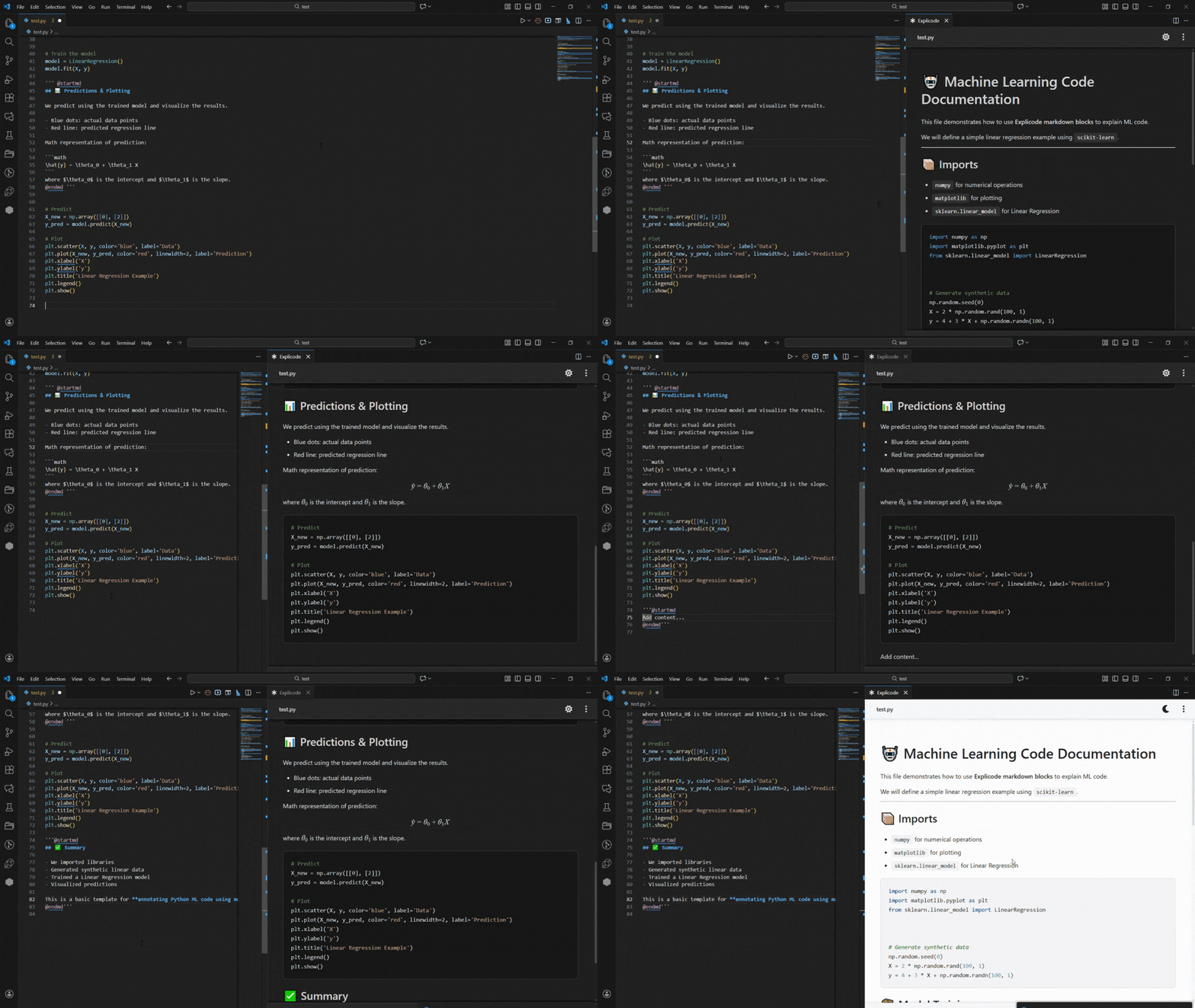
Download on the VS Code Marketplace: https://marketplace.visualstudio.com/items?itemName=Explicod...
I’m looking for feedback on usability, bugs, and new feature ideas. If you’re a developer and want to contribute to making Explicode even better, please reach out!
Eatelligence – Scan pantry items, get AI recipe suggestions #
Tech stack: React Native (Expo), Supabase for backend/auth, react-native-vision-camera for scanning, OpenAI API for recipe generation.
Built it in about a week.It's free to use with a premium tier. iOS only for now.
App Store: https://apps.apple.com/us/app/eatelligence/id6755645485
Would love feedback or questions!
Kraa – web-based markdown editor #
I'm excited to share the 'v1' of a new web-based markdown editor! There is plenty of markdown editors on the market, so one is spoiled for choice, but Kraa's approach is a little different. It's not trying to be the next Notion or Evernote – Kraa is focusing on a minimal, distraction-free writing (and reading!) experience while having rich customization options and some pretty unique features (namely a real-real-time chat, see an example link below)
It's good for notes, collaborative editing, blog, but even chat or entire communities.
Some example use cases:
Chat: https://kraa.io/hackernews
Blog article: https://kraa.io/kraa/examples/echolibrary
Long story: https://kraa.io/kraa/examples/insidekick
You don't need an account to use Kraa – we would love to hear your feedback!
Ahai – Find your ideas scattered across files - local, private #
Valknut – static analysis to tame agent tech debt #
In my work to reduce the amount of time I spend in the agentic development loop, I observed that code structure was one of the biggest determinants in agent task success. Ironically, agents aren't good at structuring code for their own consumption, so left to their own devices purely vibe-coded projects will tend towards dumpster fire status.
Agents aren't great at refactoring out of the box either, so rather than resign myself to babysitting refactors to maintain agent performance, I wrote a tool to put agents on rails while refactoring.
Another big problem I encountered trying to remove myself from the loop was knowing where to spend my time efficiently when I did dive into the codebase. To combat this I implemented a html report that simplifies identifying high level problem. In many cases you can click from an issue in the report directly to the code via VS Code links.
I hope you find this tool as useful as I have, I'm working on it actively so I'm happy to field feature requests.
SMART report viewer – Simple tool to analyze smartctl outputs #
Meeting Detection – a small Rust engine that detects meetings on macOS #
A lot of meeting recorders, productivity tools, and focus apps try to detect meetings, but the results are often unreliable. Some apps pop up “You’re in a meeting” suggestions even when nothing is happening. I wanted something that works consistently and is easy for developers to integrate.
The engine is written in Rust and exposed to Node/Electron via napi-rs. It runs a lightweight background loop and uses two tiers: 1. Native app detection (Zoom, Teams, Webex) • process detection • meeting-related network activity 2. Browser meeting detection (Google Meet, Teams Web, Zoom Web, Webex Web) • reads browser tabs via AppleScript • validates meeting URL patterns • supports Chrome, Safari, and Edge
It exposes a very simple JS API:
init(); onMeetingStart((_, d) => console.log("Meeting started:", d.appName)); onMeetingEnd(() => console.log("Meeting ended")); console.log(isMeetingActive());
Would love feedback, especially from anyone building recorders, focus apps, calendar tools, etc. Windows + Linux support coming next.
The Almanac – Generate Wikipedia-style biographies of anyone #
We’ve been building The Almanac, a tool that creates Wikipedia-style articles for any person using their full public online footprint. Unlike Linkedin where people have to maintain their own profile, we automatically crawl the internet for their roles, art, projects, collaborations, publications, media mentions, everything that’s actually documented. You can make a profile for yourself or anyone else by generating it.
A few things we focused on:
Identity disambiguation: reliably separating people with similar names - this is very tricky and something that GPT/Perplexity gets wrong very often
Full-stack research agent that crawls, filters, and writes structured articles
Detailed profiles that include timelines, infoboxes, sources, and citations
Public search plus the ability to generate your own or someone else’s profile
You can try it here: https://thealmanac.ai
Example profile: https://www.thealmanac.ai/article/davidlieb
Generate a profile (requires login) : https://thealmanac.ai/generate
We’d love feedback from the community on accuracy, product direction, and edge cases where it breaks. Happy to answer anything.
I built a simple trust portal because the existing ones were too much #
I was trying to find a very simple trust portal for my own company. All I wanted was a clean page where I could share security documents like SOC 2 and pen test reports with prospects. Nothing fancy.
Everything I found was either a huge trust center platform or something that looked free at first but then had some surprise limits hidden in the fine print. After you hit some random download cap you suddenly have to pay thousands of dollars to continue using it. It felt like every product was built for big companies with big budgets.
So I ended up writing my own tiny trust portal. I was my first user. It did what I needed, so I cleaned it up a bit and decided to share it for other small companies who just want something simple and cheap instead of emailing PDFs or sending a Google Drive link.
This is still very early and I would love feedback from the HN community. I'm especially curious what features you think a small trust portal should (or should not) have.
Thanks for taking a look.
I built a bulk image generator after seeing a YouTuber's struggle #
I built this tool after seeing a Reddit thread where a historical documentary creator described their painful workflow. They produce 30-minute videos requiring over 240 unique images. Currently, they have to manually write prompts, generate, and download images one by one for every scene.
To solve this bottleneck, I built AI Bulk Image Generator.
The Tool: https://aibulkimagegenerator.com
How it works:
I designed the workflow around two core features to maximize efficiency:
1、Prompt × N (Batch Variations): If you need to explore styles or get the perfect shot, you can input a single prompt, set a specific quantity (e.g., 10 images), and the tool will generate all variations in one batch. No more clicking "generate" repeatedly.
2、Prompts via CSV : This addresses the Reddit user's problem. You can upload a CSV file containing a list of pre-written prompts (one per line). The system automatically parses the file and creates images for every single prompt in the list. This allows you to generate assets for a full video script in one go.
Models Supported: Currently, I support a mix of models including Nano Banana / Pro, GPT-4o, and SeaDream v4. I plan to add more models based on user demand. This is an MVP aimed at content creators who need volume. I’d appreciate any feedback on the UI or the batch processing flow!
Thanks!
Safe Habits – A tiny iOS app for security awareness #
I'm a security engineer and I find most security awareness boring and easily forgettable, so I tried turning it into a practical, positive, habit-building experience that effectively helps people.
Safe Habits focuses on 12 practical security habits based on CISA, ENISA, and NIST guidance, but written in plain language for non-security experts (think MFA, phishing, updates etc.).
This app is free, without ads, and privacy first (no tracking, no analytics, no data collection). It employs very light gamification (progress ring, friendly mascot, small celebrations).
Happy to answer questions, any feedback is very welcome.